


- A print proof before payment is a PDF (usually by email) showing trim, bleed, and layout as prepress prepared it for press.
- Review that proof, request changes or complimentary fixes, and approve before you pay so errors are caught while fixes are still cheap.
- That proof-first workflow is rare among online printers, most capture your card before a human reviews your file.
If you have ever paid for print online and only then discovered a typo, a clipped logo, or a color that looked nothing like your brand on screen, you already know why print proof before payment matters. A proof is not a marketing promise. It is a concrete PDF (or soft-proof link) that shows how your job will trim, which elements sit in the safe zone, and whether prepress flagged resolution or bleed issues. This guide explains how email and PDF proofs work, what to inspect before you click approve, how proof-first ordering pairs with Pay Later checkout, and why catching mistakes on proof beats paying for a reprint. Whether you upload from Canva, send a press-ready PDF, or rely on complimentary design tuning, the discipline is the same: see the proof, fix what is wrong, then fund production.
- Proof before pay in 40 words
- Why proof-first is uncommon online
- How PDF and email proofs arrive
- Six-step proof-first workflow
- Pay Later and proof review
- What to check on every proof
- Complimentary fixes during proof
- Cost of errors by stage
- Three buyer scenarios
- Proof-first vs pay-first
- FAQ (8 questions)
What does print proof before payment mean?
Print proof before payment means production prep sends you a reviewable PDF (or equivalent digital proof) before your card is charged and before the job is scheduled on press. You inspect layout, text, images, and any prepress comments. If something is wrong, you reply in the proof thread or request changes through checkout. Payment follows approval, not the other way around. That sequence mirrors how experienced buyers work with local print shops, but it is uncommon in self-serve online carts where payment is the gatekeeper.
Why trying print proofs before you pay is rare among online printers
Most ecommerce print sites optimize for speed and card capture. Their systems assume that once money clears, the order is final. Proofs, when offered at all, may be automated thumbnails or low-resolution previews generated before anyone opens your file. Human prepress review, email delivery of a marked-up PDF, and complimentary fixes all require order logic that keeps payment fields empty while work proceeds. Inventory, shipping labels, and production scheduling still need a valid order record without a transaction ID.
Some local boutiques invoice after a physical press check, which is proof-first in a different form. What is rare is combining guest-accessible checkout, digital PDF proof delivery by email, complimentary design tuning, and a clear approve-then-pay step in one self-serve flow. We are not claiming to be the only printer on earth with flexible review. We are saying that pairing those pieces in an online cart is uncommon, which is why first-time buyers notice the difference when they can upload art, receive a proof, and pay only after sign-off.
How PDF and email proofs work
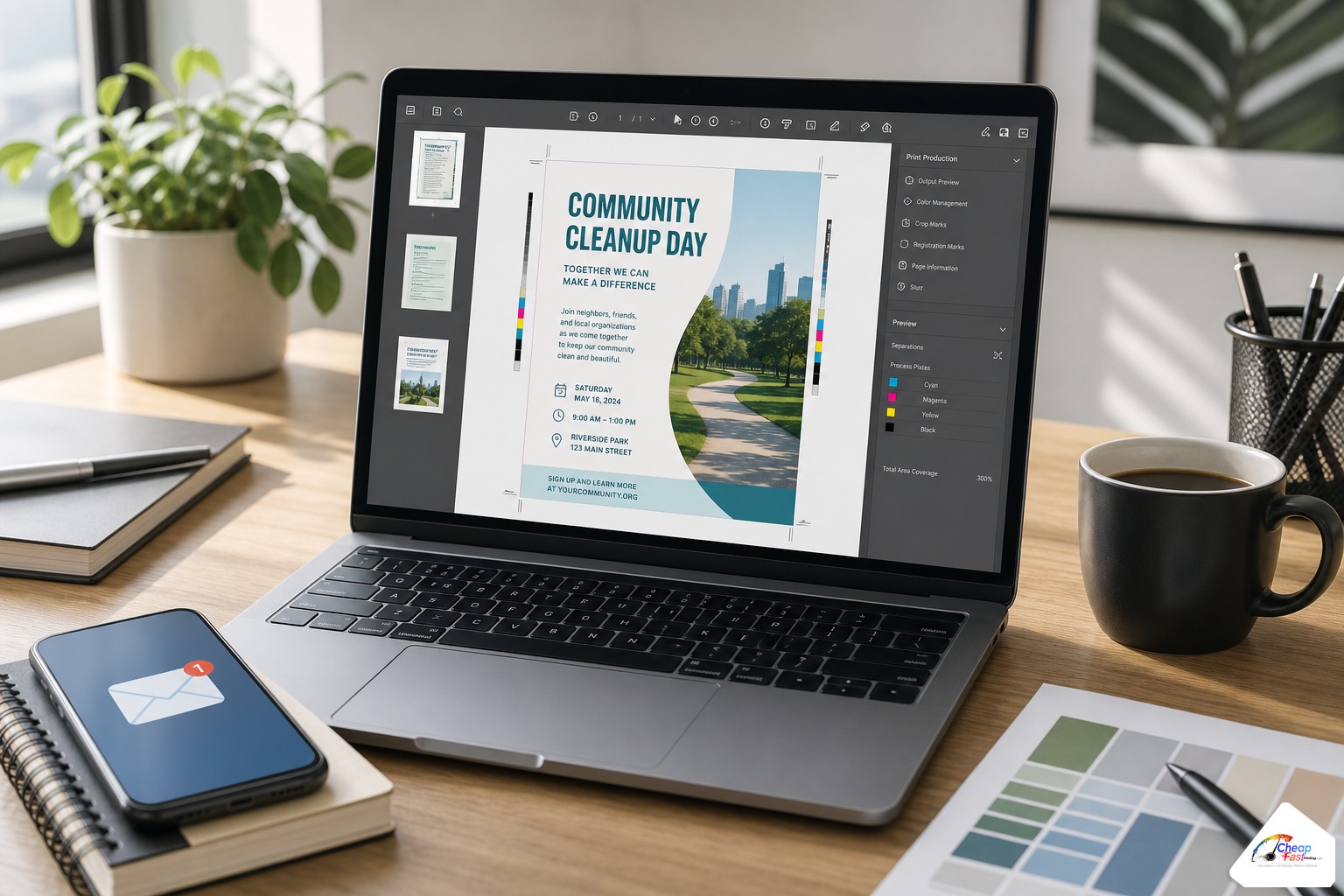
After you place an order or submit files through our upload path, prepress opens your artwork, runs preflight checks, and prepares a proof PDF that reflects how we intend to print. That file typically arrives by email with a subject line tied to your order number. The PDF may show crop marks, bleed context, or overlay guides if your original file had margin issues. Color on your monitor is still RGB unless you received a calibrated soft proof; trust prepress notes about CMYK shifts on bright reds and neon greens.
What is inside a typical proof PDF
Expect one PDF per approved side for duplex cards, or a multi-page PDF for brochures. Trim lines indicate where the cutter will land. Safe-zone guides show where type and QR codes should sit. If prepress extended a background into bleed or swapped a linked font, the proof reflects that work. Comments may appear as sticky notes or a cover email listing flags: “logo below recommended resolution,” “phone number moved inward from trim,” “RGB converted to CMYK for process print.”
Email thread as your approval record
Reply to the proof email with annotated feedback rather than approving silently when something looks off. Attach a marked-up PDF, list line-by-line corrections, or confirm “approved as shown” when every element matches your source document. That thread becomes the record of what you authorized before payment. If multiple stakeholders must sign off, forward the PDF internally before you approve on their behalf.
Soft proof vs hard proof
A soft proof is the digital PDF on screen. A hard proof is a physical press sheet or color-accurate print, often at extra cost and time. For most marketing flyers, business cards, and banners, a careful soft proof review catches typos, trim errors, and layout problems at the lowest cost. Request a hard proof when brand color matching is contractual or when a six-figure campaign depends on exact hue on a specific stock.
The proof-first workflow from upload to approval
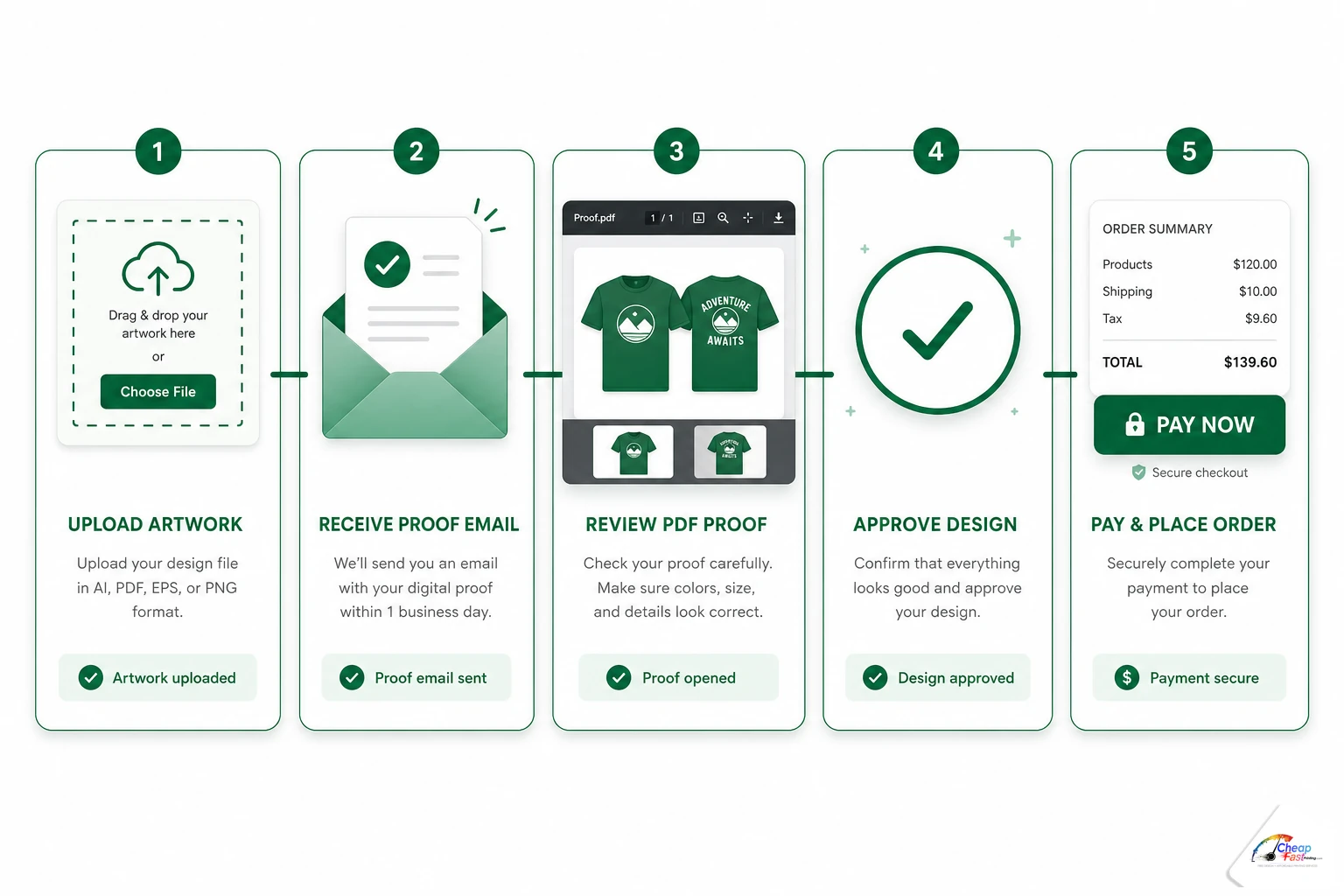
Most proof-before-pay jobs follow six visible steps. Steps overlap in real time (design edits may happen during proof review), but the sequence below is what customer success teams use when explaining timing.
- Configure and upload: Choose product specs, attach a print-ready PDF or design notes, and submit through cart or file uploader.
- Order enters prepress: Your job receives a status that allows file review without payment captured (for example Pay Later or upload-first paths).
- Preflight and fixes: Operators check bleed, resolution, fonts, and color; complimentary tuning applies when needed.
- Proof PDF emailed: You receive the review file with any prepress comments.
- Review and reply: Zoom type, check both sides, verify QR codes and legal lines; request changes or approve.
- Pay when approved: Complete payment through the link provided so the job schedules on press.
Timing expectations
Proof turnaround depends on queue depth, file complexity, and whether your upload needs a rebuild. Simple PDFs with clean bleed often proof the same business day. Canva exports missing bleed or multi-stakeholder revision threads take longer. Approve promptly when art is correct; open-ended silence can push ship dates if production slots fill. Request substantive changes early in the thread, not after multiple silent days.
How proof review ties into Pay Later checkout
Proof-first ordering and Pay Later checkout solve the same problem from different angles. Pay Later lets you complete shipping, specs, and artwork upload without entering a card first. Proof review lets you see exactly what will print before money changes hands. Together they form the lowest-risk path for new files, stakeholder approval chains, and first orders with a vendor you have not tested yet.
When you choose Pay Later at checkout, your order receives a status such as “Order Placed – Pay Later” until you approve the proof and submit payment. Production can begin file review and layout adjustments while payment remains open. Guest shoppers and logged-in account holders both follow the same proof-before-pay rules. For a full walkthrough of guest paths, logged-in fallback after card failure, and status naming, see our guide to Pay Later print checkout without payment first.
What to check on every proof PDF
Treat proof review as a final editorial pass, not a formality. Once paid production runs on large quantities, fixing a typo or wrong URL costs time and materials. Use the checklist below at 100% zoom on edges and fine type.
| Check | What to verify | Common miss |
|---|---|---|
| Spelling and numbers | Every phone, email, date, and price | Transposed digit in QR landing URL |
| Trim and bleed | Backgrounds extend past crop marks | White hairline after cut |
| Safe zone | Type and QR inset from trim | Corner QR clipped by cutter |
| Front and back | Both sides on duplex pieces | Perfect front, wrong back phone |
| Color notes | Read prepress CMYK comments | Ignoring shift warning on brand red |
| Resolution flags | Logos and photos at print size | Social icon blown up soft |
| Version | Proof matches latest source file | Approving v1 while v2 sits in inbox |
Approval discipline
Approve only when every element matches your authoritative source document. Check legal disclaimers, expiration dates on coupons, and event times on handouts. If the proof includes a prepress comment you do not understand (“logo below print minimum”), ask for clarification instead of ignoring it. Silent approval authorizes what you see, including issues you did not zoom in on.
Complimentary fixes during the proof stage
As noted on our floor, about nine orders in ten need some complimentary tuning before payment. That work happens while your order is active in prepress, not as a separate design invoice. Common fixes include extending backgrounds into bleed, converting RGB logos to CMYK, rebuilding low-resolution social icons, adjusting type size inside safe zones, and relinking higher-res photos when you only had a web PNG.
Proof-first ordering gives prepress permission to perform that normalization under the shop’s stated free setup policy. You see the corrected layout in the proof PDF before you pay. Complex creative from scratch may involve separate design products; note your needs at upload so expectations are clear. Minor fixes should not require a paid redesign hour for a missing bleed extension on a Canva flyer.
When to request a revised proof instead of approving
Request a new proof when copy changes, when a logo swap is needed, or when color shift exceeds what your brand allows. Do not approve “good enough” on a 5,000-piece run because you are tired of email. One extra proof round costs minutes; a reprint costs days and budget.
Cost of print errors by stage
Catching mistakes early is the entire economic argument for proof before pay. The table below shows typical effort and outcome by stage. Dollar amounts vary by quantity and product, but the relative ladder is consistent across commercial print.
| Stage | Typical effort | Outcome |
|---|---|---|
| Proof PDF review | 15–30 minutes on your side | Free fixes, no print charge, fastest path |
| Prepress hold after upload | Same-day designer adjustment | Delay, usually no print charge |
| Paid production then discovery | Full rerun or partial scrap | Highest cost, lost deadline, morale hit |
Building proof review into your ordering habit is the highest-return quality step for small businesses that do not employ a full-time prepress operator.
Cost to fix print errors by stage
Relative cost index if mistakes reach production. Catch issues on proof, not after delivery.
|
115Proof PDF review
|
248Prepress hold
|
3100Paid reprint
|
Proof before pay keeps fixes in the lowest-cost stages.
Three scenarios where proof before payment saves the job
Scenario 1: Canva flyer with hidden bleed problem
Tanya runs a seasonal pop-up bakery and exported a half-page flyer from Canva without enabling bleed. On Instagram the gradient looked fine. Prepress sent a proof showing white slivers at the top edge after trim. The team extended the background at no charge. Tanya approved the revised PDF and paid only when the edges looked clean. Without proof-first checkout, she might have paid upfront, received boxes with uneven borders, and blamed the printer instead of the export settings.
Scenario 2: Multi-stakeholder approval on a church bulletin
James orders 2,000 bulletins quarterly for a congregation. The pastor, music director, and office manager each care about different corners of the layout. James placed a Pay Later order Friday, received the proof PDF Saturday morning, and forwarded it to three email threads. By Sunday evening all parties signed off on the same version. He paid from the approval link Monday before the print queue filled. Proof before pay matched how the organization actually makes decisions.
Scenario 3: Low-resolution logo on business cards
A new contractor uploaded a logo pulled from a Facebook header as the only art for 500 cards. Preflight flagged effective resolution below recommended minimum at final size. The proof email included a note and a rebuilt vector outline in the PDF. The contractor compared the crisp proof to his blurry source file, approved the tuned version, and paid without ordering a separate design package. Catching resolution on proof prevented a box of fuzzy cards and a reprint conversation.
Proof-first vs pay-first: side-by-side comparison
Neither model is wrong for every job. Repeat orders with frozen art and preflight-clean PDFs can move faster on pay-first paths when you trust the file. New layouts, Canva exports, and multi-approver workflows benefit from proof before payment.
| Factor | Proof before pay | Pay first, proof after |
|---|---|---|
| Card charged | After approval | At checkout |
| Refund complexity if art wrong | Lower | Higher |
| Complimentary fix timing | Before you fund production | After money captured |
| Stakeholder sign-off | Easier (no spend yet) | Harder (finance already charged) |
| Best for repeat unchanged art | Optional | Often acceptable |
| Best for new or risky files | Strong default | Riskier |
| Typical online printer default | Uncommon | Common |
Common proof mistakes buyers make
- Approving on a phone without zooming: Fine type and QR quiet zones need desktop review at 100%.
- Checking only the front of a duplex piece: Back phone numbers and QR codes fail just as often.
- Ignoring prepress comments: Warnings about CMYK shift or resolution are not boilerplate.
- Confusing proof with quote: A proof assumes your cart specs; changing quantity after approval may revise total.
- Delaying approval indefinitely: Turnaround slots are real; approve when correct or request changes promptly.
What we store before you pay
Proof-first workflows still collect email, shipping address, and phone for legitimate fulfillment. We do not store a card number when you have not paid. Payment links after approval use the same secure processors as standard checkout. If you abandon after proof, the order may auto-cancel after a stated window; watch proof emails so you do not lose turnaround.
Upload your artwork or design notes, receive a PDF proof by email, and pay only after you approve what you see.
Frequently asked questions
What is print proof before payment?
Print proof before payment means you receive a reviewable PDF (usually by email) showing trim, layout, and prepress adjustments before your card is charged and before the job schedules on press. You approve or request changes, then pay when the proof matches your expectations.
How do email PDF proofs work?
After upload or checkout, prepress prepares a proof PDF reflecting intended print output. It arrives by email tied to your order. Reply with corrections or approve as shown. Payment typically follows approval through a secure link.
Is proof before pay the same as a free proof?
Related but not identical. A free proof is the deliverable. Proof before pay is the sequence: review that deliverable before funding production. Some sites offer proofs only after payment; proof-first checkout keeps payment after review.
What should I check on a print proof PDF?
Verify spelling, phone numbers, URLs, QR codes, bleed and trim, safe zones, both sides of duplex pieces, color notes from prepress, and resolution flags. Zoom to 100% on small type before approving.
Are design fixes really free before I pay?
Our production team reports that about 90% of orders receive complimentary tuning (bleed, CMYK, resolution, simple layout fixes) before payment is captured. Complex creative from scratch may involve separate design products; note your needs at upload.
How does proof review work with Pay Later checkout?
Pay Later places your order into prepress without charging your card first. You receive the proof PDF, approve when correct, then pay. Guest and logged-in shoppers both use the same proof-before-pay sequence on Pay Later paths.
How rare is proof before payment among online printers?
Most online print carts require payment before an order enters production. Some local shops invoice after physical press checks. Self-serve digital proof delivery with approve-then-pay and complimentary fixes is uncommon among commodity ecommerce print sites.
What happens if I find an error after I already paid?
Contact the shop immediately. Some issues may be stoppable if the job has not run yet. After press, fixes usually require a reprint at additional cost. That is why proof review before payment is the lowest-risk default for new files.